Sunday, February 9, 2014

Concordance Sticker for Book Appropriate for Classroom Collection


         The word wall sticker I created came from Eric Carle’s The Very Hungry Caterpillar. I had some trouble figuring out the “Label Wizard” template from my Microsoft Word program, so I figured I would create a chart with three columns in that measured 3.5” by 4.”  First, I typed every word from the book into a word document. Then, I used Wordle.net to gather the most popular words from the book by pasting all of the words into the text box. This site automatically deletes repeated words and common words like a, of, and the. Wordle.net creates word clouds of provided text. Next, I clicked on the Layout dropdown menu and selected that all the words be presented alphabetically and in a horizontal orientation. This made it easy for me to type the significant words in alphabetical order. Lastly, I typed the words from the book into each column and formatted the text and columns to the appropriate measurements.
            I could use this “sticker” as an “in-the-book word wall” for my students. They could use these words to practice spelling them, write them in their own stories, or practice reading them automatically. 


apple
ate
beautiful
big
better
built
butterfly
cake
caterpillar
cherry
chocolate
cocoon
cupcake
egg
felt
five
food
four
Friday
green
hole
hungry
ice cream cone
lay
leaf
lollipop
Monday
moon
morning
next
nice
night
one
oranges
out
pears
pickle
pie
piece
plums
pushed
salami
Saturday
slice
small
started
still
stomachache
strawberries
Sunday
Swiss cheese
three
Thursday
tiny
Tuesday
two
warm
watermelon
Wednesday

Wednesday, February 5, 2014

Digital Diorama


     Below is an image of my digital diorama. In a previous blog I had made just a traditional shoe box diorama that did not incorporate any digital media or technology. The point of the activity for my Technology and Literacy course was to include photographs that I took with a digital camera... (in my case, I did use my iPhone because it is actually a better quality camera than my Cannon Powershot). Nevertheless, here is my diorama: It shows a panoramic image of my son's bedroom with other photos of him in the foreground to show how he's grown over his first year.


Sunday, February 2, 2014

Blog post: reflect on your own use of using audio playback when writing (also include some refrences


 1) personal observations/feelings/preferences  

       I use text-to-speech frequently and have learned that It can be very beneficial. I work with visually impaired students and I am certain they benefit greatly from the voice over function and text-to-speech playback of their writing. I use a Mac computer and have experimented using various voices and speeds of playback understand that everyone has their own preferences so the options can be just as helpful as the option of text-to-speech alone.

2) Take a position  
       Like I said, I use text-to-speech frequently and have personally benefited from this feature. I use the voice of Alex at a medium fast rate of speech and find that to be the most helpful in reading emails, essays, or my own writing.  I think that text-to-speech should be used with any student who can access that sort of accommodation. 

3) support with references
       Lauren Hall (2012) expressed her stance that listening to one’s own writing using text-to-speech can allow for better understanding of the text, enable the writer to find and hear typos or grammatical errors, and ultimately, develop strategic listening and supports educational endeavors, including effective communication skills. Furthermore, multiple reviews and rereads using text-to-speech greatly reduces eyestrain.


Hall, L. (2012, November 21). Multiple benefits for text-to-speech. Retrieved from              http://www.lc2.ca/item/85-multiple-benefits-of-text-to-speech-applications

Blog posting on using text-to-speech as part of the writing process

Text-to-Speech can be extremely useful for a lot of people especially while they are writing. When you hear what you've typed you can immediately reflect on what's been written. If there are glaring mistakes they can be fixed after using text-to-speech functions. Lastly, text-to-speech can help students become stronger writers in the long run.

Paper Rater Analysis and Thoughts


            PaperRater.com is a tool that can be used to analyze word documents copied and pasted directly into the textbox on the site. The website checks papers for spelling and grammar errors, as well as word choice, style, and vocabulary use. Furthermore, it automatically checks the paper for evidence of plagiarism. If desired, the user could print a copy of the paper’s analysis and see a score for each area evaluated and a final grade based on the writing alone. It does not however evaluate the paper for specific content.
 

I found PaperRater.com to be very beneficial for my own writing and saw its potential for easier grading of papers for high school teachers or college professors. I pasted a sample document (Article Review 1) provided in my course’s BlackBoard page into the PaperRater text box and titled it article review. The analysis revealed 4 spelling errors, 2 grammar errors, and an overall grade of 77%. Then, I pasted an old discussion/blog post that I wrote myself into the text box and had the website analyze that sample. I found 0 spelling errors and technically 0 grammar errors, however, the analysis of the website made an error itself because it noted that I had not put an apostrophe in the word: didn’t, but I clearly did when I reviewed the text that I pasted originally. That was the only flaw I could see besides my grade of a 75%. I was surprised to see my score compared to the sample article review since the sample posted in BlackBoard bad several errors.  Overall, however, I found the PaperRater website to be helpful and will continue to use it in future work.

Auto Correct text-to-picture

Here is a screen shot of my Autocorrect activity. I think this function is really fascinating and can be useful for my preK students. They could write (type) their friends' names, vocabulary words for the week, or word families like hat, cat, bat, and mat...

Digital Diorama

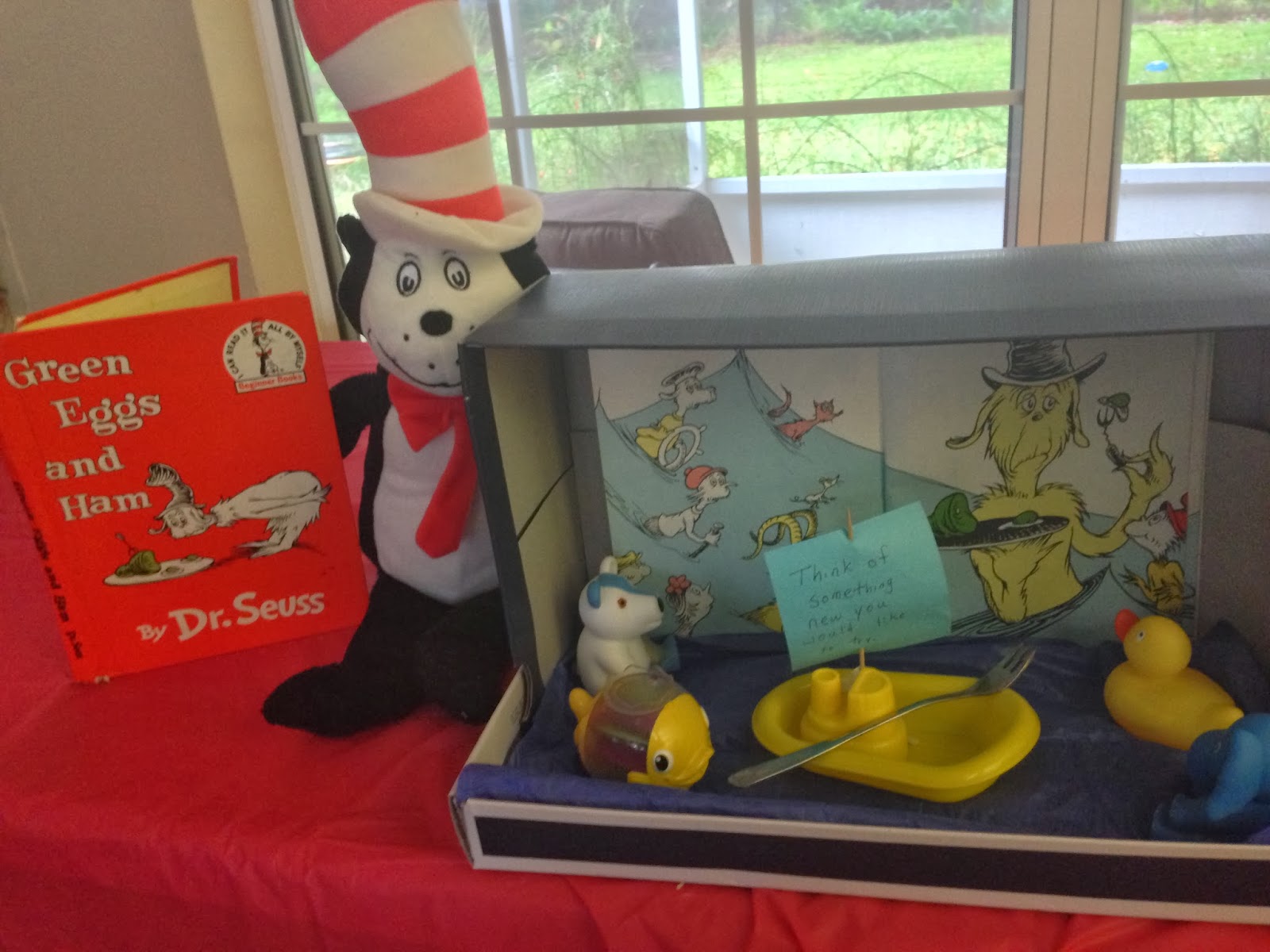
This is a photo of a diorama I made... my wife had fun helping me to create it too. The post it note attached to the boat (like its sail) says: "Think of something new you would like to try."  This could be used as a writing prompt for students as young as preschoolers and as old as 12th graders.